 Azzouzana
Apify · monetization · guide
Dev guide: how to best pick a date to migrate from rental to PPE while reducing chargebacks
Switching an Apify Actor from rental to pay-per-event (PPE) triggers a 14-day notice period. Time it wrong and Apify auto-refunds users who prepaid rent but got flipped to a new model mid-cycle — clawed back from your payout. This guide has two goals: pick a submit date that minimizes chargebacks, and know what to expect when your next invoice lands after the switch. Prefer a short version? →
Why submit timing matters
Apify requires roughly 14 days between when you submit a monetization change and when it goes live:
Submit date + 14 days = Effective date
On a rental model, subscribers prepay for the month. If you switch them to PPE while they’re still inside that prepaid window, Apify automatically refunds them — it’s built into the platform, not users manually calling their bank. You still eat the revenue clawback.
In practice, these “chargebacks” are refunds to users for the remaining days of their prepaid rental period — always pro-rated (unused days ÷ 30 × rent). Someone who paid $20 for a month on Nov 13 still has unused rental days if PPE goes live on Dec 1 — Apify credits them back for that portion only, and that amount is clawed back from your payout. Time the switch so most subscribers have finished their prepaid month first.
The fix isn’t guessing. Your Insights → Monetization chart shows when renewals hit — but the shape varies by Actor: one big spike, several smaller cohorts, or a chart that looks spread out with no obvious peak. Match your data to a pattern first, then apply the formula.
Goal 2: the next invoice after the switch
Even with decent timing, your first developer payout / invoice after PPE goes live can come as a shock compared with rental months: chargeback and refund line items, prepaid rental revenue tailing off, PPE usage still finding its level. That’s normal — not necessarily a sign you picked the wrong date. Compare against the approximate chargeback math in this guide, not against a peak rental month. Minimizing chargebacks is goal 1; reading the post-change invoice without panicking is goal 2.
Revenue patterns — yours may not be a single cluster
Before you pick dates, classify what you see in the monthly chart under Insights → Monetization:
| Pattern | What it looks like | How to time the switch |
|---|---|---|
| One dominant cluster | Most rent lands in a few days; rest is quiet or tiny batches | Effective ≈ cluster end + ~30 days, then confirm the date is before the next month’s renewals on those same slots — see Scenario D trap. |
| Multiple clusters | Two or more distinct spikes (e.g. day 5, 15, and 28 each month) | Run the active-renewal rule per day-of-month slot. Set effective after the latest cluster you’re protecting, but check the following month’s renewal calendar on the same slots. |
| Looks flat / spread | Many small bars; no obvious spike — common when renewals are staggered | Export JSON, list renewals by day-of-month, then run the active-renewal rule per slot — savings are usually modest, not dramatic. |
Multiple clusters: you rarely get zero chargeback on every slot at once. Run the active-renewal rule per day-of-month — subs renew monthly on the same dates, so the following month’s calendar matters as much as the spike you’re avoiding.
Looks flat? You might still shave a little off chargebacks with careful timing, but don’t expect a big win — and don’t trust eyeballing the Monetization chart. Use exported data; sparse or small bars are easy to misread.
Step-by-step: map your renewal clusters
- In Apify Console, open your Actor → Insights tab → Monetization.
- Set the view to monthly. Note every day-of-month where rent spikes (e.g. 12th, 13th, 20th). If the chart looks flat, skip visual guessing — pull JSON and tabulate by date instead.
- For each busy slot, record sub count and rent per renewal (each $20 bar ≈ one sub).
- Pick which pattern from the table above fits, then apply the active-renewal rule for your target effective date — one row per slot, not one lump per cluster.
Not 100% accurate. This is a heuristic — past Monetization charts are a guide, not a forecast. Subscribers may not renew (churn), and new users can subscribe on different days than last month’s pattern. Chargeback totals and optimal dates can shift. Use this to reduce risk, not eliminate it — then hope for the best 😅
Worked example: one dominant cluster + smaller cohorts
This is one real rental Actor — everyone’s data is different. November had $180 total at 100% margin: a mid-month cluster (~67% of revenue) plus a few one-off renewal days. Yours may be multiple spikes, one dominant cluster, or a visually flat chart — use the pattern table and JSON workflow on your Monetization data, not these dates.
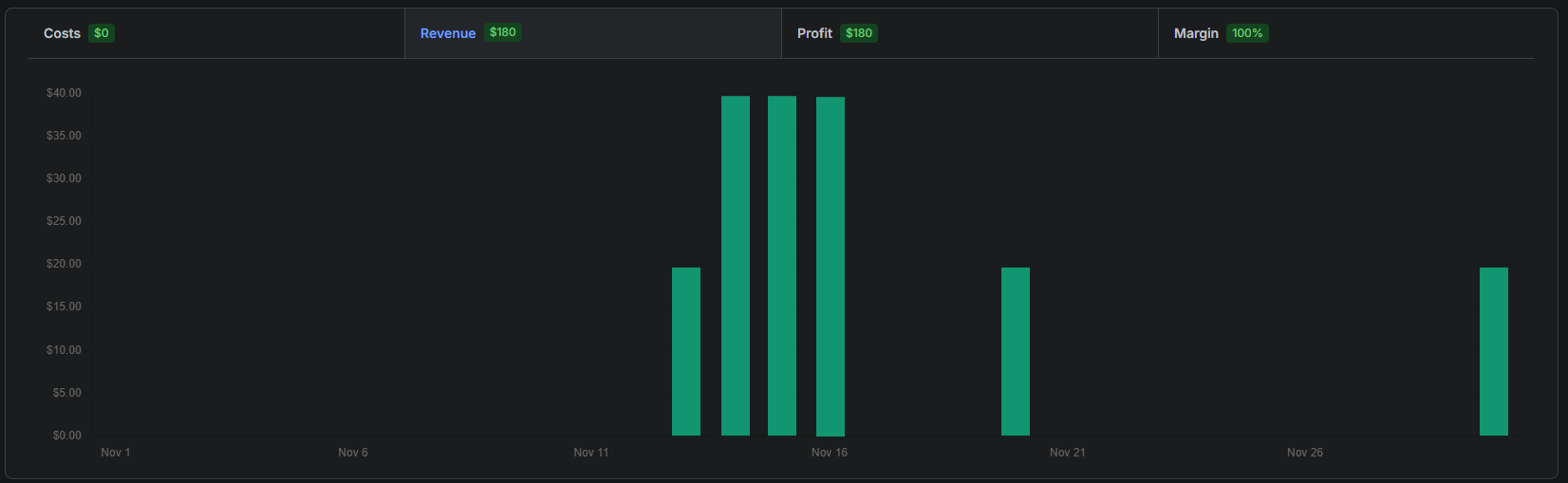
| Date | Daily revenue | Notes |
|---|---|---|
| Nov 1–11 | $0 | Quiet — no renewals |
| Nov 12 | $20 | Small batch |
| Nov 13 | $40 | 2 subs renew |
| Nov 14 | $40 | 2 subs renew |
| Nov 15 | $40 | 2 subs renew |
| Nov 16–19 | $0 | Quiet |
| Nov 20 | $20 | Secondary cohort |
| Nov 21–29 | $0 | Quiet |
| Nov 30 | $20 | End-of-month renewal |
The math: rental → PPE (dominant-cluster example)
Goal 1: don’t switch to PPE while subscribers are still inside a prepaid rental window — calculated per day-of-month slot, using whichever renewal is active on the effective date. Below walks through the dominant-cluster example; for multiple spikes, add one row per slot in each spike.
Chargeback formula (always pro-rated, per sub, per active renewal)
Assume each $20 bar = one monthly rental renewal (30-day prepaid). November total = $180 (9 renewals). The main cluster is not one block — Nov 13, Nov 14, and Nov 15 each have their own subs and prepaid end dates. Sum chargebacks slot by slot:
Chargeback = (unused days ÷ 30) × $20 · unused days = last prepaid day − effective date + 1 (0 if PPE starts after last prepaid day)
A Nov 13 renewal covers 30 days → last prepaid day Dec 12. That sub’s November cycle is finished on Dec 13 — but the same sub renews again on Dec 13, starting a new prepaid window through Jan 11.
Critical rule — active renewal per slot: subs renew on roughly the same day-of-month every month. For each slot (12th, 13th, 20th…), ask: which payment is still mid-prepaid on the effective date?
- If that slot’s current-month renewal has not happened yet → use the prior month renewal (e.g. Nov 14 effective, Nov 20 slot → Oct 20 payment still active).
- If that slot’s current-month renewal has happened (effective day is after that slot in the month) → use that payment (e.g. Dec 15 effective, Nov 12 slot → Dec 12 payment just renewed — 27 unused days).
- If effective lands on a slot’s renewal day during a spike → count that day’s payment too (Scenario C, Nov 14 slot on Nov 14 effective). If the same-day renewal hasn’t posted yet, the prior month cycle may already be expired → $0 (Scenario D, Nov 15 slot on Dec 15 effective).
The November Monetization chart tells you how many subs renew on each day-of-month. The chargeback table must use whichever renewal is active on your effective date — not always the November row.
| Slot (day) | Subs | Nov revenue | Last prepaid (Nov payment) |
|---|---|---|---|
| 12th | 1 | $20 | Dec 11 |
| 13th | 2 | $40 | Dec 12 |
| 14th | 2 | $40 | Dec 13 |
| 15th | 2 | $40 | Dec 14 |
| 20th | 1 | $20 | Dec 19 |
| 30th | 1 | $20 | Dec 29 |
Scenario A — recommended: Nov 27 submit → Dec 11 effective
Window after the November spike prepaid periods are mostly tailing off, but before Dec 12–14 renewals fire. Every row uses the November payment (December renewals on those slots have not happened yet):
| Slot | Active renewal | Subs | Last prepaid | Unused days | Chargeback | % of $180 |
|---|---|---|---|---|---|---|
| Nov 12 | Nov 12 | 1 | Dec 11 | 1 | $0.67 | 0.4% |
| Nov 13 | Nov 13 | 2 | Dec 12 | 2 | $2.67 | 1.5% |
| Nov 14 | Nov 14 | 2 | Dec 13 | 3 | $4.00 | 2.2% |
| Nov 15 | Nov 15 | 2 | Dec 14 | 4 | $5.33 | 3.0% |
| Nov 20 | Nov 20 | 1 | Dec 19 | 9 | $6.00 | 3.3% |
| Nov 30 | Nov 30 | 1 | Dec 29 | 19 | $12.67 | 7.0% |
| Total | $31.33 | 17.4% | ||||
Scenario B — too early: Nov 17 submit → Dec 1 effective
Every slot still mid-prepaid on its November payment — December renewals have not started yet (Dec 1 is before the 12th):
| Slot | Active renewal | Subs | Last prepaid | Unused days | Chargeback | % of $180 |
|---|---|---|---|---|---|---|
| Nov 12 | Nov 12 | 1 | Dec 11 | 11 | $7.33 | 4.1% |
| Nov 13 | Nov 13 | 2 | Dec 12 | 12 | $16.00 | 8.9% |
| Nov 14 | Nov 14 | 2 | Dec 13 | 13 | $17.33 | 9.6% |
| Nov 15 | Nov 15 | 2 | Dec 14 | 14 | $18.67 | 10.4% |
| Nov 20 | Nov 20 | 1 | Dec 19 | 19 | $12.67 | 7.0% |
| Nov 30 | Nov 30 | 1 | Dec 29 | 29 | $19.33 | 10.7% |
| Total | $91.33 | 50.7% | ||||
Scenario C — during spike: Oct 31 submit → Nov 14 effective
PPE lands during the November spike. Nov 12–14 rows use November payments; Nov 20 / Nov 30 slots use October payments (November renewals on those days not paid yet):
| Slot | Active renewal | Subs | Last prepaid | Unused days | Chargeback | % of $180 |
|---|---|---|---|---|---|---|
| Nov 12 | Nov 12 | 1 | Dec 11 | 28 | $18.67 | 10.4% |
| Nov 13 | Nov 13 | 2 | Dec 12 | 29 | $38.67 | 21.5% |
| Nov 14 | Nov 14 | 2 | Dec 13 | 30 | $40.00 | 22.2% |
| Nov 15 | — | 2 | — | — | $0.00 | 0% |
| Nov 20 | Oct 20 | 1 | Nov 18 | 5 | $3.33 | 1.9% |
| Nov 30 | Oct 30 | 1 | Nov 28 | 15 | $10.00 | 5.6% |
| Total | $110.67 | 61.5% | ||||
Nov 15 slot: Nov 15 payment not made yet on Nov 14 — prior Oct 15 cycle already expired → $0. Nov 14 slot on Nov 14 effective: same-day spike renewal counts (30 unused days).
Scenario D — trap: Dec 1 submit → Dec 15 effective
Classic mistake: November cluster looks cleared, but Dec 12–14 renewals already happened — those subs just paid rent and are mid-prepaid again. Nov 20 / Nov 30 slots still use November payments (Dec 20 / Dec 30 not yet):
| Slot | Active renewal | Subs | Last prepaid | Unused days | Chargeback | % of $180 |
|---|---|---|---|---|---|---|
| Nov 12 | Dec 12 | 1 | Jan 10 | 27 | $18.00 | 10.0% |
| Nov 13 | Dec 13 | 2 | Jan 11 | 28 | $37.33 | 20.7% |
| Nov 14 | Dec 14 | 2 | Jan 12 | 29 | $38.67 | 21.5% |
| Nov 15 | Nov 15 | 2 | Dec 14 | 0 | $0.00 | 0% |
| Nov 20 | Nov 20 | 1 | Dec 19 | 5 | $3.33 | 1.9% |
| Nov 30 | Nov 30 | 1 | Dec 29 | 15 | $10.00 | 5.6% |
| Total | $107.33 | 59.6% | ||||
Nov 15 slot on Dec 15: Dec 15 payment not posted yet; Nov 15 cycle expired Dec 14 → $0. Same method on your Actor: one row per day-of-month slot, using whichever renewal is active on the effective date.
Recommended timeline (Scenario A)
- November cluster ends Nov 15 — prepaid tails run through ~Dec 14
- Dec 12–14 renewals on the same slots would start fresh chargeback exposure — avoid effective dates after Dec 11 unless you accept ~$107+ clawback
- Target effective = Dec 11 (last day before Dec 12 renewals) → submit Nov 27
- Residual chargebacks on Dec 11: all slots still have small tails — heaviest are Nov 20 + Nov 30 ($31.33 total, 17.4%)
| Action | Date | Chargebacks |
|---|---|---|
| Submit rental → PPE change | Nov 27 | — |
| PPE goes live | Dec 11 | — |
| Per slot on Dec 11 — see Scenario A table above | ||
| Total | $31.33 (17.4% of $180) | |
Timelines to avoid — see Scenarios B, C & D
| Submit | Effective | Chargebacks | Why |
|---|---|---|---|
| Dec 1 | Dec 15 | $107.33 (59.6%) Dec 12–14 renewals mid-prepaid — see Scenario D |
Cluster + 30 lands on Dec 15, but December renewals already fired |
| Oct 31 | Nov 14 | $110.67 (61.5%) Nov 12–14 spike + Oct 20 $3.33 + Oct 30 $10.00 — see Scenario C |
PPE during November spike |
| Nov 17 | Dec 1 | $91.33 (50.7%) All November renewals mid-prepaid — see Scenario B |
Too early — every November slot still active |
Quick rule of thumb
- List every renewal cluster (start → end) from Insights → Monetization — or, if the chart looks flat, export JSON and count by day instead of eyeballing.
- One dominant cluster: effective ≈ cluster end + ~30 days, then verify you’re before the next month’s renewals on the same day-of-month slots.
- Multiple clusters: run the active-renewal rule per slot; effective after the latest cluster you’re protecting, but check the following month’s renewal calendar.
- Looks flat / spread: perfectly even renewals are rare — you can usually trim chargebacks a little, but gains are modest. Use JSON, not the chart alone.
- Submit date = effective date − 14 (all patterns).
- Never set effective date inside a cluster or 1–3 days after it.
For this Actor only: November spike ends Nov 15, but the lowest-chargeback window is Dec 11 effective (submit Nov 27) — before Dec 12–14 renewals. Blindly using cluster end + 30 → Dec 15 hits fresh December prepaid (~$107). Your dates will differ — always check the next month’s renewals on the same slots.
My workflow (with AI)
The November chart and tables in this guide are one illustration — your Monetization data will look different. Different sub counts, rental prices, renewal days, and cluster shapes mean your submit and effective dates will not match mine. Use the pattern logic here; plug in your numbers.
- Open your Actor → Insights tab → Monetization (monthly view for the cycle you care about).
- Export the data — JSON from the Network tab is best (DevTools → Network → filter XHR/fetch while Monetization loads, copy the response). A screenshot works for a quick pass but is easier to misread.
- Paste into your AI tool with context, for example:
“I’m switching this Apify Actor from rental to PPE (14-day notice: submit + 14 = effective). Here’s my Insights → Monetization data [paste JSON or paste the screenshot]. Map renewal day-of-month slots (which days have rent, how many subs). For my suggested effective date, use whichever renewal is still mid-prepaid per slot — current month if already paid, prior month if not. Suggest submit and effective dates to minimize chargebacks. Show math per slot.”
- Cross-check the suggested submit and effective dates against your data — cluster start/end, not just the tallest bar. AI can be off by a day when labels are sparse.
- Submit the rental → PPE change in Apify Console.
When in doubt, pick an effective date before the next month’s renewals on your busiest slots — not blindly cluster end + 30 if that lands after Dec 12-style renewals on the same day-of-month.
Tip: JSON beats screenshots. Include rental price per sub if you know it (e.g. each $20 bar = one renewal). If the chart looks flat, say so — but still paste JSON so the AI tabulates daily renewals instead of inventing spikes or telling you timing doesn’t matter.
I still sanity-check the output myself. AI is good at tabulating clusters from raw data; you own the final submit date in Console.
FAQ
Is this 100% accurate?
No. You’re projecting from past renewal days — a heuristic, not a forecast. Existing subscribers may not renew, so chargebacks can come in lower than the math suggests — or a spike shifts to different days next month. New subscribers can land on different days entirely. Trial bursts, promos, and Actor growth all move the chart. The tables show approximate chargebacks for a static snapshot; real outcomes will vary. Hope for the best 😅
Are these manual user chargebacks?
No. When a monetization change conflicts with a prepaid rental period, Apify refunds users automatically on the platform — for the unused days left in their rental month, not because someone filed a bank chargeback. You’re timing the change to avoid that clawback from your developer revenue.
Does this apply to PPE → rental or price increases?
The 14-day rule applies to all monetization changes. This guide focuses on rental → PPE because prepaid rent makes chargeback timing especially sensitive.
What if revenue looks flat across the month?
Perfectly even spread is almost impossible in practice — chargeback savings are usually modest. Export JSON, map day-of-month slots, and run the active-renewal rule per slot for your target effective date.
What if I have several renewal clusters, not one spike?
Run the active-renewal rule per day-of-month slot in each spike — not one row per cluster. For your effective date, check both the spike you’re avoiding and the following month’s renewals on the same slots. See Scenarios A–D.
How do I know which renewal is “active” for a slot?
Subs renew on roughly the same day-of-month every month. On effective date D, for slot S: if D > S, use the current month’s payment on day S; if D < S, use the prior month’s payment on day S. Same-day (D = S) depends on context — during a spike, that day’s renewal counts (Scenario C); if the new month’s payment hasn’t posted yet, the prior cycle may be expired (Scenario D). See the rule list in the math section.
Where is the 14-day rule documented?
Apify’s monetization change flow in Console enforces a notice period before changes go live. Confirm current policy in Apify docs.